Access Statistics
Access Statistics analyzes results of all access requests from various perspectives to understand bot attack status.
Overview
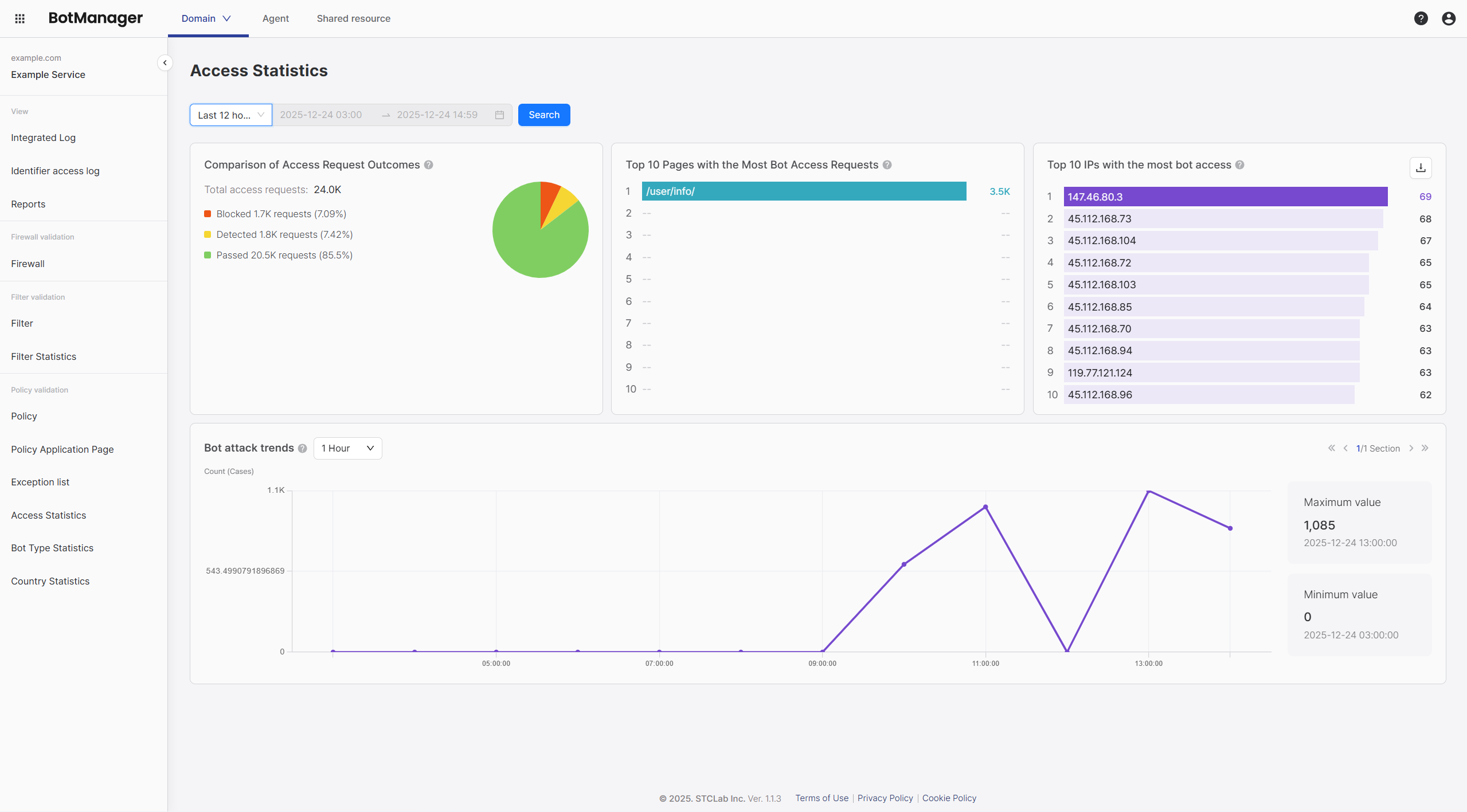
The access statistics screen displays the following information:
- Access request result comparison (block/detect/pass)
- Top 10 bot access pages
- Top 10 bot access IPs
- Bot attack trend chart
Query Period Configuration
You can set the query period at the top:
| Setting | Description |
|---|---|
| Start Date/Time | Query start time |
| End Date/Time | Query end time |
Access Request Result Comparison
Total Access Requests
Displays the total number of access requests during the query period and distribution by result. Access statistics classifies all requests into three results—Block, Detect, and Pass—to provide an overview of bot attack status at a glance.
Access Request Result Meanings
| Result | Description | Action Mode |
|---|---|---|
| Block | Number of requests blocked by policies | When policies are set to Blocking Mode, requests determined to be bots are blocked. Blocked requests do not reach the server. |
| Detect | Number of requests detected as bots but passed | When policies are set to Detection Mode, requests determined to be bots are only recorded in logs and passed. Used for monitoring purposes. |
| Pass | Number of requests determined to be normal | Requests from normal users that passed bot detection policies. |
Data Interpretation Guide
You can evaluate bot attack scale and policy effectiveness through access request results.
| Situation | Interpretation | Recommended Action |
|---|---|---|
| High block ratio (20% or more) | Active bot attacks are ongoing and policies are effectively blocking them | Maintain policies, strengthen monitoring, check main attack types in Bot Type Statistics |
| Many detections but no blocks | All policies are operating in detection mode | Review switching main policies to blocking mode in Policy Configuration |
| Very high pass ratio (90% or more) | Few bot attacks or policies are not sufficiently activated | Check policy activation status, compare with Bot Type Statistics to check for detection misses |
| Sudden increase in block + detect ratio | Possible new attack pattern | Analyze attack patterns by checking Top 10 Bot Access IPs and Top 10 Bot Access Pages |
Characteristics of Access Statistics
Access statistics analyzes the flow of all requests from time, page, and IP perspectives. This differentiates it from Bot Type Statistics, which focuses on attack type classification.
Top 10 Bot Access Pages
Displays the top 10 pages that bots accessed most frequently.
| Rank | Page | Access Count |
|---|---|---|
| 1 | /api/products | 1,234 |
| 2 | /api/users | 987 |
| 3 | /login | 765 |
| ... | ... | ... |
How to Use
Analysis Points:
- Check if bot access is concentrated on specific pages
- Identify attacks on event/promotion pages
- Analyze attack patterns on API endpoints
Top 10 Bot Access IPs
Displays the top 10 IP addresses with the most bot access.
| Rank | IP | Access Count |
|---|---|---|
| 1 | 203.0.113.xxx | 5,678 |
| 2 | 198.51.100.xxx | 4,321 |
| 3 | 192.0.2.xxx | 3,210 |
| ... | ... | ... |
How to Use
Analysis Points:
- Identify IPs repeatedly appearing in top rankings
- Check datacenter/cloud IP ranges
- Review malicious IP list registration
Bot Attack Trends
Displays bot attack trends by time period in a chart.
Chart Composition
Example of bot attack trends by time period:
| Time Period | Attack Count |
|---|---|
| 00:00 | 100 |
| 04:00 | 150 |
| 08:00 | 800 |
| 12:00 | 600 |
| 16:00 | 450 |
| 20:00 | 200 |
| Item | Description |
|---|---|
| Peak | Maximum attack count and time within query period |
| Lowest | Minimum attack count and time within query period |
How to Use
Analysis Points:
- Identify attack peak time periods
- Business hours vs non-business hours attack patterns
- Analyze correlation between specific events and attacks
Detailed Statistics Data
Access Request Statistics Structure
Key Metrics
| Metric | Calculation Method | Meaning |
|---|---|---|
| Bot Ratio | (Block + Detect) / Total Requests | Ratio determined to be bots |
| Block Rate | Block / (Block + Detect) | Ratio of blocking mode application |
| Peak Time | Maximum request time | Attack concentration time |
Usage Scenarios
Scenario 1: Daily Monitoring Routine
Goal: Quickly understand bot attack status daily and detect anomalies
Procedure:
- Set query period to previous day 00:00 ~ 23:59
- Check block/detect ratio in Access Request Result Comparison
- If sudden increase compared to usual → Check peak time in Bot Attack Trends
- If ratio is within normal range → Daily monitoring complete
- Check IPs repeatedly appearing in top rankings in Top 10 Bot Access IPs
- If same IP appears in top for 3 or more days → Review registration in Malicious IP List
- If anomalies found → Check attack types in Bot Type Statistics
Scenario 2: Event/Promotion Period Intensive Monitoring
Goal: Detect and respond to bot attacks concentrated during specific periods in real time
Procedure:
- Set query period from event start time to end time
- Check event-related pages in Top 10 Bot Access Pages
- If event page appears in top → Review strengthening policies for that page
- Example:
/event/promotionpage → Activate Excessive Direct Requests to Specific Path Policy
- Analyze attack patterns in Bot Attack Trends
- Sudden increase right after event start → Judge as expected traffic
- Sudden increase at abnormal time → Additional investigation needed
- Check for distributed attacks in Top 10 Bot Access IPs
- Small attacks from various IPs → Suspect distributed bot attack
- Concentrated attacks from specific IP → Review blocking that IP
Scenario 3: Strengthen Protection for Specific Pages/API Endpoints
Goal: Identify bot attacks on important pages or APIs and strengthen protection level
Procedure:
- Set query period to last 7 days
- Check pages requiring protection in Top 10 Bot Access Pages
- Example: API endpoints like
/api/users,/api/products
- Example: API endpoints like
- Analyze access patterns for those pages
- Check attack time periods for those pages in Bot Attack Trends
- Check IPs attacking those pages in Top 10 Bot Access IPs
- Apply protection measures
- Activate Excessive Direct Requests to Specific Path Policy
- Register repeatedly attacking IPs in Malicious IP List
- Monitor after measures
- Re-query the same period the next day to verify effectiveness
Scenario 4: Detailed Analysis and Response for Suspicious IPs
Goal: Identify IPs that repeatedly attack and decide appropriate actions
Procedure:
- Identify IPs to analyze in Top 10 Bot Access IPs
- IPs appearing in top for 3 or more days
- IPs with abnormally high counts
- Check IP detailed information
- Check full IP address (unmask)
- Check if it is a datacenter/cloud IP (e.g., AWS, GCP, Azure)
- Analyze access patterns
- Check attack time periods for that IP in Bot Attack Trends
- Check pages that IP mainly attacks in Top 10 Bot Access Pages
- Decide actions
- If judged as malicious IP → Register in Malicious IP List to block
- If possibility of normal user → Register in Exception Target List for exception processing
- If uncertain → Decide after additional monitoring