Country Statistics
Country Statistics analyzes country-by-country distribution of access requests and bot access status to understand regional attack patterns.
Overview
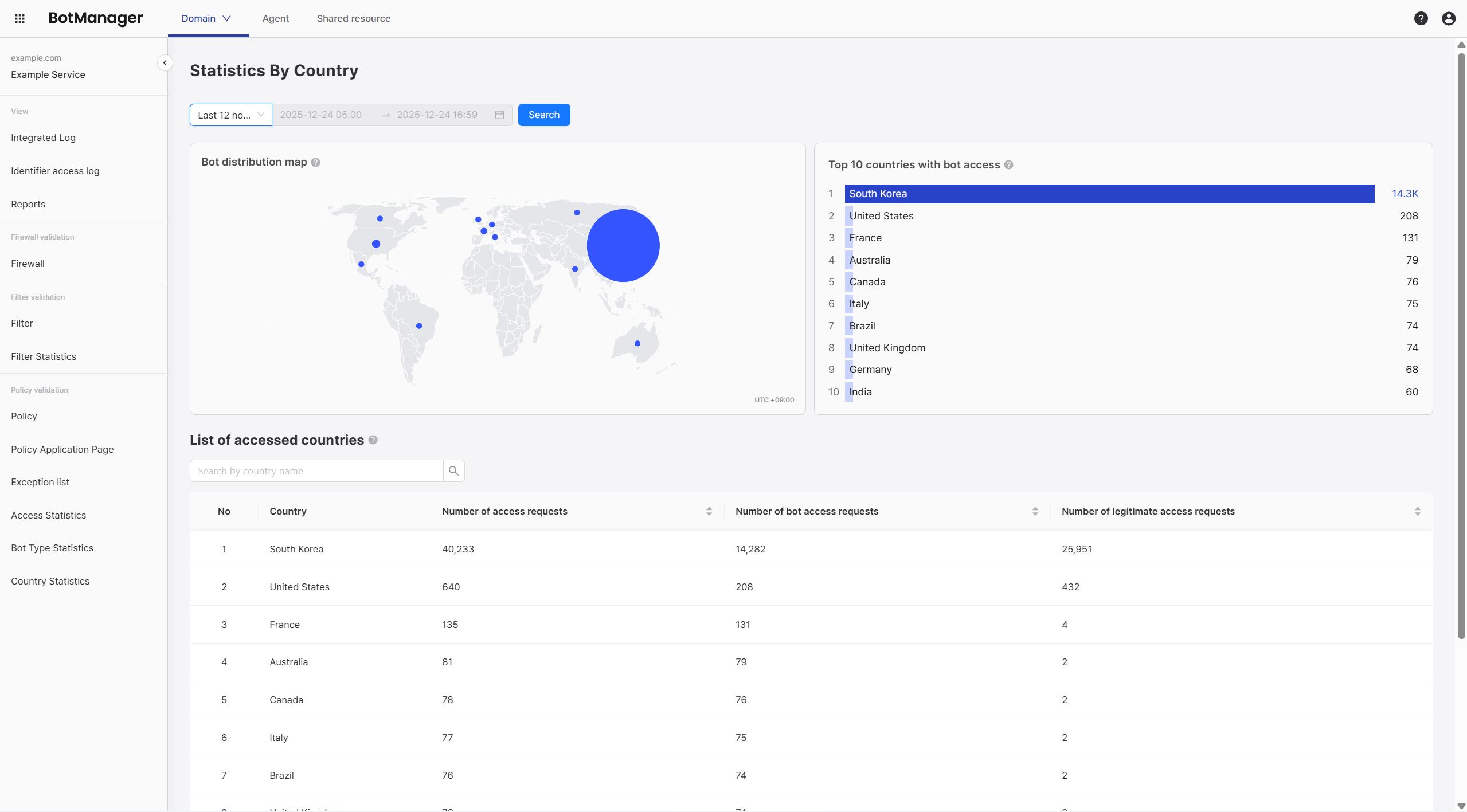
The country statistics screen displays the following information:
- Bot distribution map
- Top 10 bot access countries
- Access country list
Differences from Other Statistics
Country Statistics focuses on regional distribution, unlike Access Statistics and Bot Type Statistics:
| Category | Access Statistics | Bot Type Statistics | Country Statistics |
|---|---|---|---|
| Perspective | Flow of all requests (time, page, IP) | Classification by attack type | Regional distribution |
| Key Question | "Where, when, and how much were we attacked?" | "What type of attack?" | "Which region attacked us?" |
| Usage Purpose | Understand attack scale, analyze IP/page | Evaluate policy effectiveness | Foreign IP policy integration, regional blocking strategy |
| Combined Usage | Check attack types with bot type statistics | Check attack scale with access statistics | Use for foreign IP management policy configuration |
Bot Distribution Map
Displays country-by-country bot access distribution on a world map visually. Larger circles indicate more bot access, and smaller circles indicate less.
Analysis Points:
- Identify regions where bot attacks are concentrated at a glance
- Visually confirm domestic vs foreign attack ratios
- Check for concentrated attacks from specific countries
Top 10 Bot Access Countries
Displays the top 10 countries with the most bot access.
| Rank | Country | Bot Access Count |
|---|---|---|
| 1 | Korea | 15,432 |
| 2 | United States | 8,765 |
| 3 | China | 5,432 |
| 4 | Russia | 3,210 |
| 5 | Vietnam | 2,109 |
| ... | ... | ... |
Access Country List
Displays detailed statistics for all access countries.
| Rank | Country | Access Request Count | Bot Access Request Count | Normal Access Request Count |
|---|---|---|---|---|
| 1 | Korea | 100,000 | 15,432 | 84,568 |
| 2 | United States | 20,000 | 8,765 | 11,235 |
| 3 | China | 10,000 | 5,432 | 4,568 |
| ... | ... | ... | ... | ... |
Usage Scenarios
Scenario 1: Responding to Foreign Bot Attacks - "Many attacks are coming from overseas?"
Situation: When you want to identify and block bot attacks concentrated from overseas
Key Insights:
- If 5 or more foreign countries appear in Top 10, it's a signal that foreign attacks are concentrated
- If foreign bot ratio is 50% or more, you should review activating foreign IP management policies
- For domestic-only services, blocking mode is safe; for global services, starting with detection mode is safe
Analysis Method:
-
Check foreign country proportion
- If 5 or more foreign countries appear in top rankings in Top 10 Bot Access Countries → Foreign attacks concentrated
- Check if foreign regions have large circles in Bot Distribution Map
-
Calculate foreign bot ratio
- Sum bot access counts for all countries except Korea in Access Country List
- Calculate foreign bot access count ratio relative to total bot access count
- Foreign bot ratio 50% or more → Review activating foreign IP management policies
-
Configure foreign IP management policies
- Find "Foreign IP Management" policy in Policy Configuration
- Domestic-only service → Set to blocking mode
- Global service → Start with detection mode and monitor
-
Verify effectiveness
- Monitor for 3 days after policy configuration
- If foreign bot ratio decreases → Policy effective
- If foreign bot ratio remains same → Need to check policy application pages
Scenario 2: Protecting Domestic-Only Services - "I want to allow only domestic users"
Situation: When you want to completely block foreign access for services targeting only domestic users
Key Insights:
- Setting foreign IP management policy to blocking mode will block most foreign access
- If there are foreign users who need exceptions, they must be registered in exception target list
- If foreign access approaches 0 after policy application, the policy is working effectively
Configuration Method:
-
Confirm service target countries
- Clearly identify countries where service is provided (e.g., only Korea allowed)
-
Set foreign IP management policy to blocking mode
- Find "Foreign IP Management" policy in Policy Configuration
- Set action mode to "Block"
-
Monitor effectiveness
- Check foreign access in Country Statistics
- If foreign access approaches 0 → Policy effective
- If some foreign access exists → Need to check policy application pages
-
Exception handling
- If there are foreign users who need exceptions
- Register IPs in Exception Target List
- Or adjust policy to allow only specific countries
Scenario 3: Responding to Concentrated Attacks from Specific Countries - "Attacks keep coming from a certain country"
Situation: When you want to identify and block attacks concentrated from specific countries
Key Insights:
- If a specific country is 1st place and 2x or more than 2nd place, you should suspect concentrated attacks
- If that country's bot access ratio is 80% or more, bot attacks are mainly occurring from that country
- For global services, it's good to apply additional policies for that country's IPs
Analysis Method:
-
Identify concentrated attack countries
- Check if specific countries are abnormally high in Top 10 Bot Access Countries
- Example: Russia is 1st place and 2x or more than 2nd place → Suspect concentrated attacks
- Check if that country has large circles in Bot Distribution Map
-
Check that country's bot access ratio
- Check that country's bot access request count and access request count in Access Country List
- Calculate bot access ratio = bot access request count / access request count × 100
- Bot access ratio 80% or more → Bot attacks mainly occurring from that country
-
Check attack types
- Check attack types for that country in Bot Type Statistics
- Identify which policies are effective
-
Response measures
- For global services: Strengthen policies corresponding to those attack types
- For domestic-only services: Set foreign IP management policy to blocking mode
-
Verify effectiveness
- Re-analyze after 1 week to check attack pattern changes
- Check if that country's bot access has decreased
Scenario 4: Regional Security Strategy for Global Services - "I want to apply different security levels by region"
Situation: When you want to apply different security levels by region for global services
Key Insights:
- Countries can be classified as high-risk/medium-risk/low-risk based on country-by-country bot access ratios
- It's efficient to focus on strengthening security for high-risk countries (80% or more)
- Risk levels must be periodically re-evaluated (monthly recommended)
Analysis Method:
-
Evaluate risk level by country
- Check each country's bot access request count and access request count in Access Country List
- Calculate bot access ratio = bot access request count / access request count × 100 and group by country:
- 80% or more: High-risk countries (bot attacks mainly occurring from those countries)
- 50-80%: Medium-risk countries (mix of bots and normal users)
- Less than 50%: Low-risk countries (more normal users)
-
Check attack types for high-risk countries
- Check attack types in conjunction with Bot Type Statistics
- Identify which policies are effective
-
Establish regional security strategies
- High-risk countries: Review applying additional policies for those country IPs, strengthen secondary verification
- Medium-risk countries: Strengthen monitoring, periodic checks
- Low-risk countries: Maintain current settings
-
Regular monitoring
- Re-evaluate risk levels monthly
- Check trends in country-by-country bot access ratio changes
- Adjust strategies for countries with changed risk levels